🚀 Supercharge Your Flutter Web App: Deploy with Ease on Google Cloud Run
As a backend developer, I often find myself collaborating closely with my frontend team to ensure the seamless deployment of web…
🚀 Supercharge Your Flutter Web App: Deploy with Ease on Google Cloud Run
As a backend developer, I often find myself collaborating closely with my frontend team to ensure the seamless deployment of web applications. Recently, our frontend team brought forth a pressing challenge that was slowing down our development workflow.
Problem Statement 🤔
They were responsible for managing a Flutter web application running on a Google Cloud Platform (GCP) virtual machine (VM). While the app itself was impressive, the deployment process left much to be desired.
The existing deployment workflow was a multi-step ordeal:
- Build the Flutter web app.
- Upload the app to the VM.
- Unzip the uploaded package.
- Extract the contents into the appropriate Apache directory.
- And sometimes, things went awry, causing deployment to drag on for far too long.
Initial Attempt with Docker Image Deployment 🐳
Our initial approach was to implement Docker image deployment on the VM using GitHub Actions. While this seemed promising, it quickly became apparent that it came with its own set of complexities and challenges.
🤯 The process of creating Docker images occasionally led to failures, leaving us scratching our heads.
🔒 SSH connections to the VM sometimes failed unexpectedly, causing frustrating delays in the deployment process.
⌛ Timeouts became a common occurrence, further exacerbating the deployment woes.
It was clear that our initial attempt was far from the seamless deployment solution we were aiming for.
Cloud Run The Saviour ☁️
In our quest to find a more efficient deployment solution and streamline collaboration, we stumbled upon Cloud Run — a game-changer in our deployment journey.
Here are some key features we harnessed:
Auto Deployment from GitHub 🚀
- Seamless integration with GitHub.
- Cloud Build triggers for automatic builds and deploys.
Containerization Made Easy 🐳
- Dockerfile for defining environment and dependencies.
- Automatic container building and deployment.
Auto-Scaling for Efficiency ⚖️
- Dynamic scaling based on incoming requests.
- Cost-effective resource allocation.
Fetching Code from GitHub 🔄
- Real-time collaboration among team members.
- Automatic deployment of pushed changes.
Cost Efficiency 💰
- Pay-as-you-go pricing model.
- No charges for idle time.
Robust Monitoring and Logging 📊
- Detailed logs and metrics.
- Integration with monitoring tools like Stackdriver.
Solution — Implementation: 😜
Now let’s jump into the actual solution which worked for us, adding all the templates that worked for us so you can also utilize the same or modify it according to your needs.
In this solution phase we will go through
- Docker setup for your project
- Apache and server file setup to smooth running of you application in cloud run
- And at the end the cloud run setup.
Step 1: Setting Up Docker in Repo
- Add this docker file to you existing repo
# This file go into the root directory as {project/path}/Dockerfile

# Stage 1: Build the application
FROM dart:stable AS build

# Install dependencies for Flutter
RUN apt-get update && apt-get install -y curl git unzip xz-utils zip libglu1-mesa

# Clone the Flutter repository
RUN git clone https://github.com/flutter/flutter.git /usr/local/flutter

# Set the Flutter path
ENV PATH="/usr/local/flutter/bin:/usr/local/flutter/bin/cache/dart-sdk/bin:${PATH}"

# Checkout the specific version of Flutter
RUN flutter channel stable
RUN flutter upgrade
RUN git -C /usr/local/flutter checkout 1f6bdb6
#above after checkout is commit hash which indicates the version of flutter
#to learn more about flutter versioning, please visit https://flutter.dev/docs/development/tools/sdk/releases?tab=linux

# Verify Flutter installation
RUN flutter doctor

# Set working directory
WORKDIR /app

# Copy over your app
COPY pubspec.* /app/
RUN flutter pub get
COPY . /app
RUN flutter pub get --offline
RUN flutter clean
RUN flutter build web --release --no-tree-shake-icons

# Stage 2: Create the runtime environment with Apache
FROM httpd:alpine

# Install gettext for envsubst
RUN apk add --no-cache gettext

# Copy the built app to the Apache server directory
COPY --from=build /app/build/web/ /usr/local/apache2/htdocs/

# Expose port
EXPOSE 8080

# Copy the Apache configuration template and startup script
COPY httpd.conf.template /usr/local/apache2/conf/httpd.conf.template

# Add a shell script to start Apache with the right PORT
COPY start-apache.sh /usr/local/bin/start-apache.sh

RUN chmod +x /usr/local/bin/start-apache.sh

# Start Apache using the startup script
CMD ["start-apache.sh"]- Above docker file is multi stage
- In first stage we download dependency of flutter and generate the build
- In second stage we setup apache to host this as static site in cloud run
- Now add a apache configuration file to make port dynamic as cloud run expect an open port configuration for application
# This file go into the root directory as {project/path}/httpd.conf.template

ServerRoot "/usr/local/apache2"
Listen ${PORT}
LoadModule mpm_event_module modules/mod_mpm_event.so
LoadModule authn_file_module modules/mod_authn_file.so
LoadModule authn_core_module modules/mod_authn_core.so
LoadModule authz_host_module modules/mod_authz_host.so
LoadModule authz_groupfile_module modules/mod_authz_groupfile.so
LoadModule authz_user_module modules/mod_authz_user.so
LoadModule authz_core_module modules/mod_authz_core.so
LoadModule access_compat_module modules/mod_access_compat.so
LoadModule auth_basic_module modules/mod_auth_basic.so
LoadModule reqtimeout_module modules/mod_reqtimeout.so
LoadModule filter_module modules/mod_filter.so
LoadModule mime_module modules/mod_mime.so
LoadModule log_config_module modules/mod_log_config.so
LoadModule env_module modules/mod_env.so
LoadModule headers_module modules/mod_headers.so
LoadModule setenvif_module modules/mod_setenvif.so
LoadModule version_module modules/mod_version.so
LoadModule unixd_module modules/mod_unixd.so
LoadModule status_module modules/mod_status.so
LoadModule autoindex_module modules/mod_autoindex.so
LoadModule dir_module modules/mod_dir.so
LoadModule alias_module modules/mod_alias.so
LoadModule proxy_html_module modules/mod_proxy_html.so

User daemon
Group daemon

ServerAdmin you@example.com

    AllowOverride none
    Require all denied

    Options Indexes FollowSymLinks
    AllowOverride None
    Require all granted

    DirectoryIndex index.html

    Require all denied

ErrorLog /proc/self/fd/2
LogLevel warn

    LogFormat "%h %l %u %t "%r" %>s %b "%{Referer}i" "%{User-Agent}i"" combined
    LogFormat "%h %l %u %t "%r" %>s %b" common
    CustomLog /proc/self/fd/1 common

    ScriptAlias /cgi-bin/ "/usr/local/apache2/cgi-bin/"

    AllowOverride None
    Options None
    Require all granted

    RequestHeader unset Proxy early

    TypesConfig conf/mime.types
    AddType application/x-compress .Z
    AddType application/x-gzip .gz .tgz

    MIMEMagicFile conf/magic

Include conf/extra/proxy-html.conf- And finally just add server file with name start-apache.sh in project root directory and add below script in it to run server smoothly
#!/bin/sh

# Substitute environment variables in Apache configuration
envsubst  /usr/local/apache2/conf/httpd.conf

# For debugging: print the PORT variable and the resulting httpd.conf
echo "PORT: $PORT"

# cat /usr/local/apache2/conf/httpd.conf -> Debugging only

# Start Apache in the foreground
exec httpd -DFOREGROUND- Above file add port from env using envsubst to and replace actual apache config.
- Dynamic port is must else it will fail in cloud run.
- Now after adding all these just try by running application locally for testing use below command to verify
1 docker build -t my-flutter-app . -> For building
2 docker run -d -p 8080:8080 -e PORT=8080 my-flutter-app -> To run after builiding- If all above works fine push it to Github.
Step 2: Setting Up Cloud Run
- Begin by navigating to the Google Cloud Console and creating a new project or selecting an existing one.
- In the Cloud Console, activate the Cloud Run API for your project.
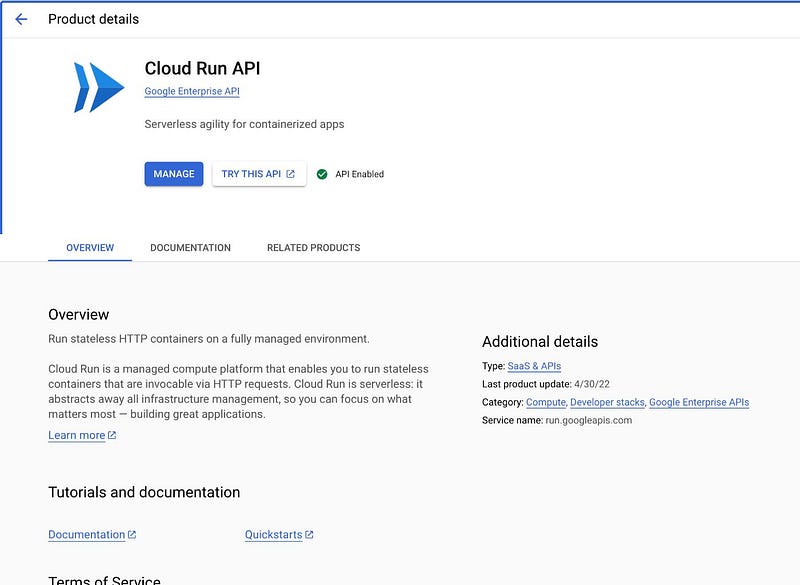
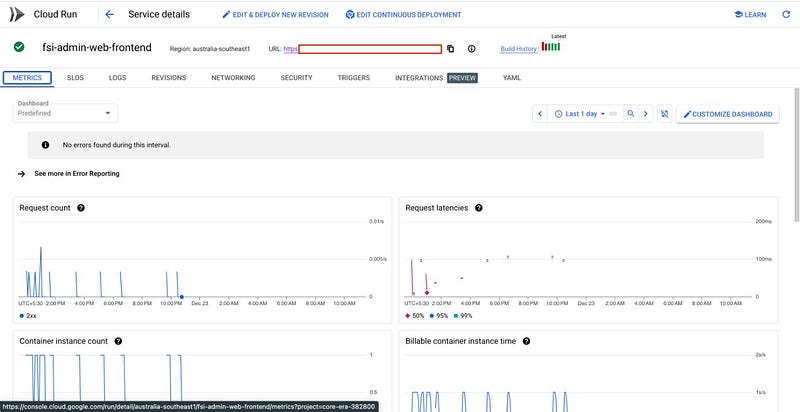
- You will be able to see the cloud run here something like in below image.
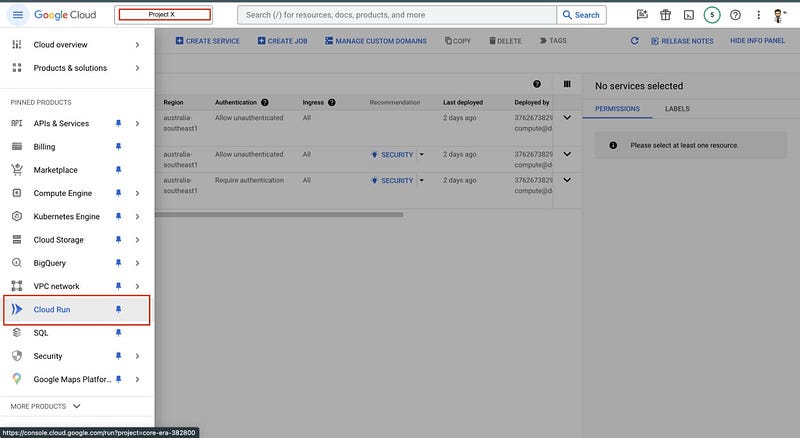
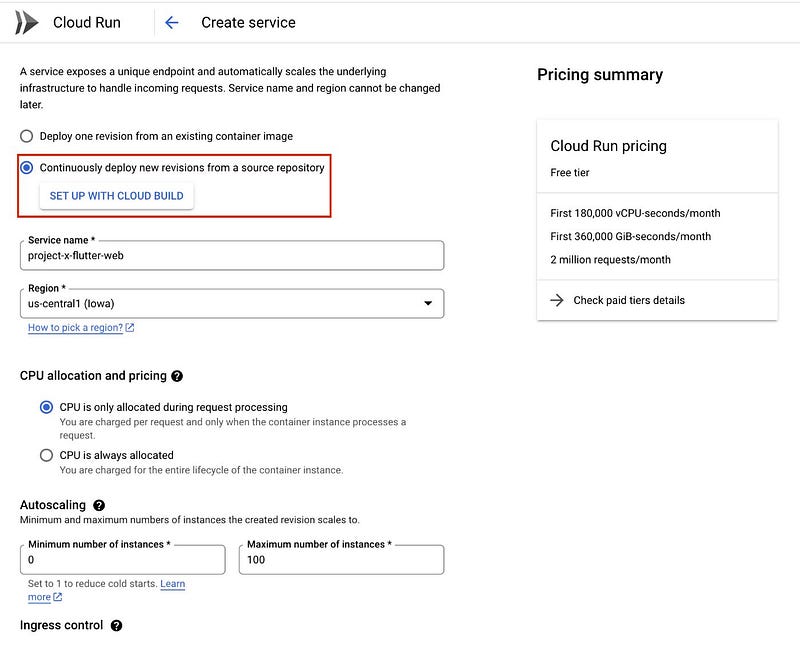
- Now create cloud run service
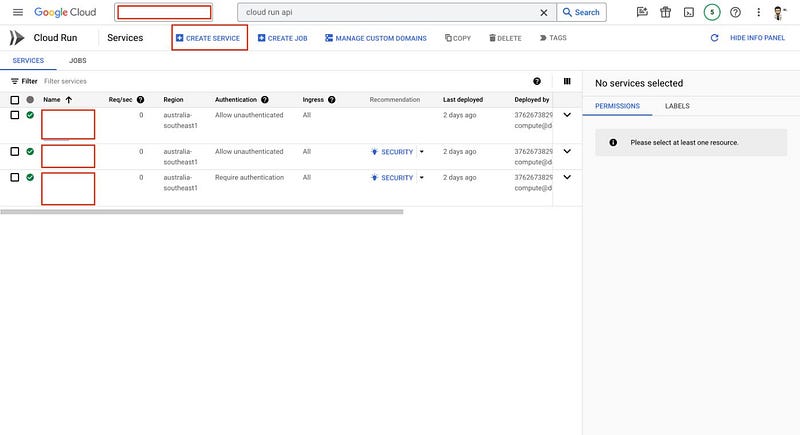
- Fill the details and select the cloud build as option
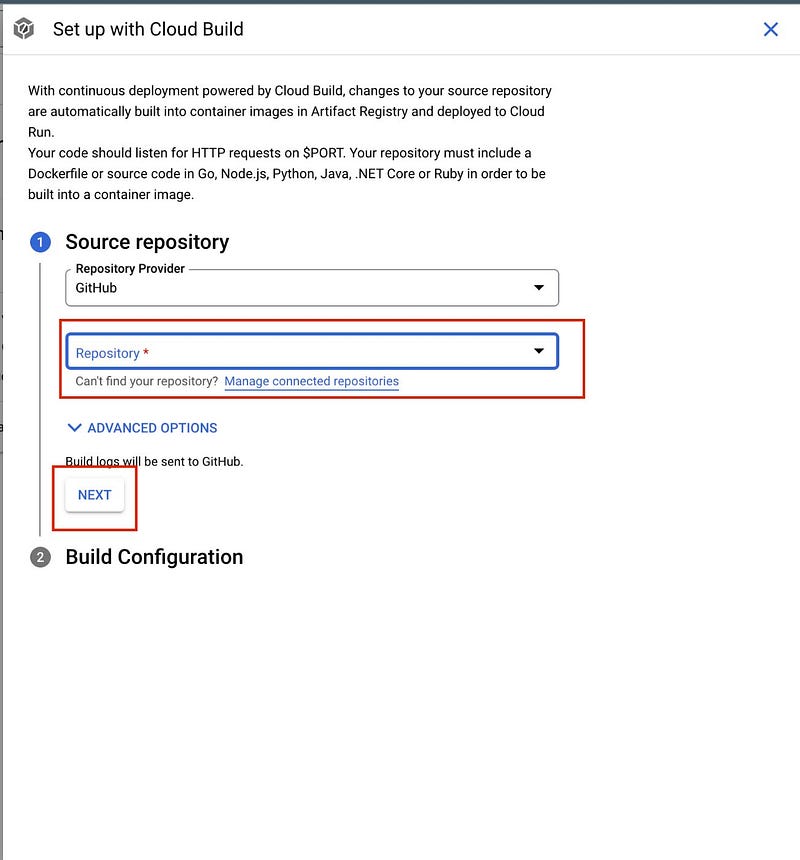
- Select the Repo and Branch and setup docker file in option
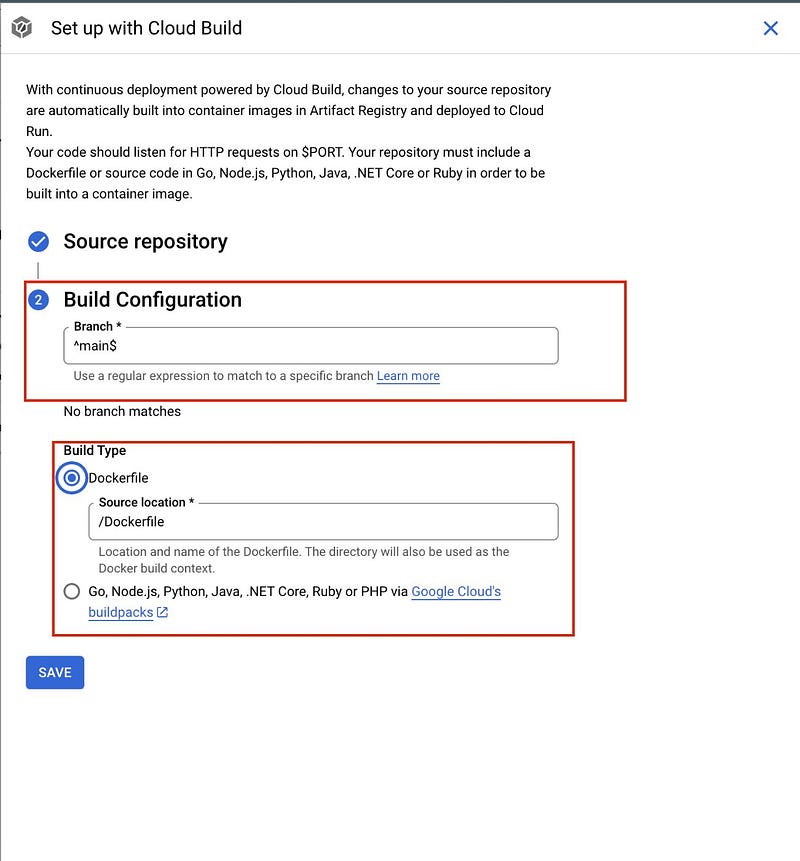
- Now click on save and that’s it.
- Now build will start and you will be able to see it in cloud build section.
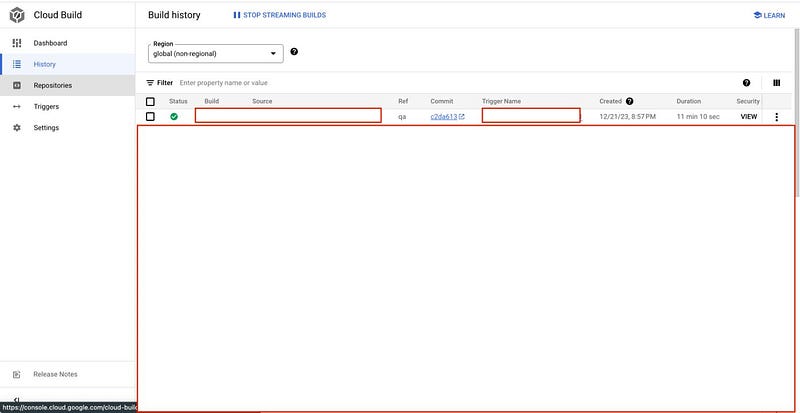
- At the end after successful build you can check you web application on external ip provided by cloud run
The Journey 🚗
This blog captures our journey from a challenging deployment process to a streamlined and efficient solution using Cloud Run. With features like auto deployment, containerization, auto-scaling, and cost efficiency, Cloud Run has become a vital tool in our development arsenal. Say goodbye to deployment woes and embrace Cloud Run for a smoother development experience. ☁️🚀
Join the Conversation! 💬
We hope you found our journey to a more efficient deployment process inspiring and informative. But the conversation doesn’t end here! We’d love to hear from you and learn about your experiences with deployment, troubleshooting, and collaboration.
Share Your Story 📢
Have you encountered deployment challenges similar to ours, or do you have your own unique experiences to share? Whether it’s a deployment triumph or a troubleshooting tale, your story can provide valuable insights to the community.
Ask Questions ❓
If you have questions about the Cloud Run setup, Docker deployment, or any other topic covered in this blog, don’t hesitate to ask. I and fellow readers are here to help you find solutions.
Connect with Us 🌐
Join us on social media, where we regularly share tips, updates, and insights about web development and deployment. Follow us on Twitter, LinkedIn, or Facebook to stay connected with our growing community of developers.
Feedback and Suggestions 📝
We value your feedback! Is there a specific topic you’d like us to explore in future blogs? Do you have suggestions on how we can improve our deployment process even further? Let us know; your input shapes the content we create.
Stay Tuned for More 📅
Don’t miss out on our future blog posts! Subscribe to our newsletter or follow our blog for the latest updates, tutorials, and stories from the world of web development and deployment.
Thank you for joining us on this deployment journey, and we look forward to engaging with you in the comments, on social media, and in future blog posts. Together, we can make deployment easier and more efficient for everyone! 🚀🌐